Start with your expertise.
Build your business presence.
Create your free interactive showroom. Organize the companies, brands, products and services you know—and start building direct commercial relationships from your expertise.
The platform opens in a new tab. Keep this guide open to continue exploring.
Your expertise is a starting point.
You may be an engineer, buyer, sales professional, technician, service specialist or manager. Begin with a personal space built around what you know and the businesses you want to connect with.
Select
Explore Sector Cities, companies, products and services relevant to your expertise.
Curate
Select companies, brands, products and services. Arrange your showroom into categories and share its own URL.
Connect
Message the supplying companies, request quotations, negotiate terms and develop direct sales or sourcing relationships.
A practical place to begin.
Your own showroom
Create categories, organize your selected companies, brands, products and services, and share your independently addressed showroom by URL.
Connected company & offering information
Selected products and services come with their connected supplying companies and brands, offering details, specifications and supporting information.
AI Advisor access
Use the AI assistance associated with the selected offerings.
Direct business connections
Use direct messages, inquiries and RFQs to request offers, negotiate commercial discounts and agreements, place orders and progress toward closing business.
Select what you know.
Make it your starting point.
Bring relevant offerings together.
Start in My MarineWorld. Save the products and services relevant to your expertise, with their supplying companies connected.
Shape your own showroom.
Organize your selections into categories and share your showroom URL with potential customers and partners.
Open the exact offering.
Each selected product or service opens its own public interactive showroom with company information and commercial actions.
Start the conversation.
Contact the company, request an offer or send an RFQ. Agree your commercial role and next steps directly.
01 — Your personal workspace
My MarineWorld brings your saved offerings together. This illustrative My Products view combines a yacht, a cargo vessel, a marine generator and navigation equipment, with their supplying companies and direct commercial actions.
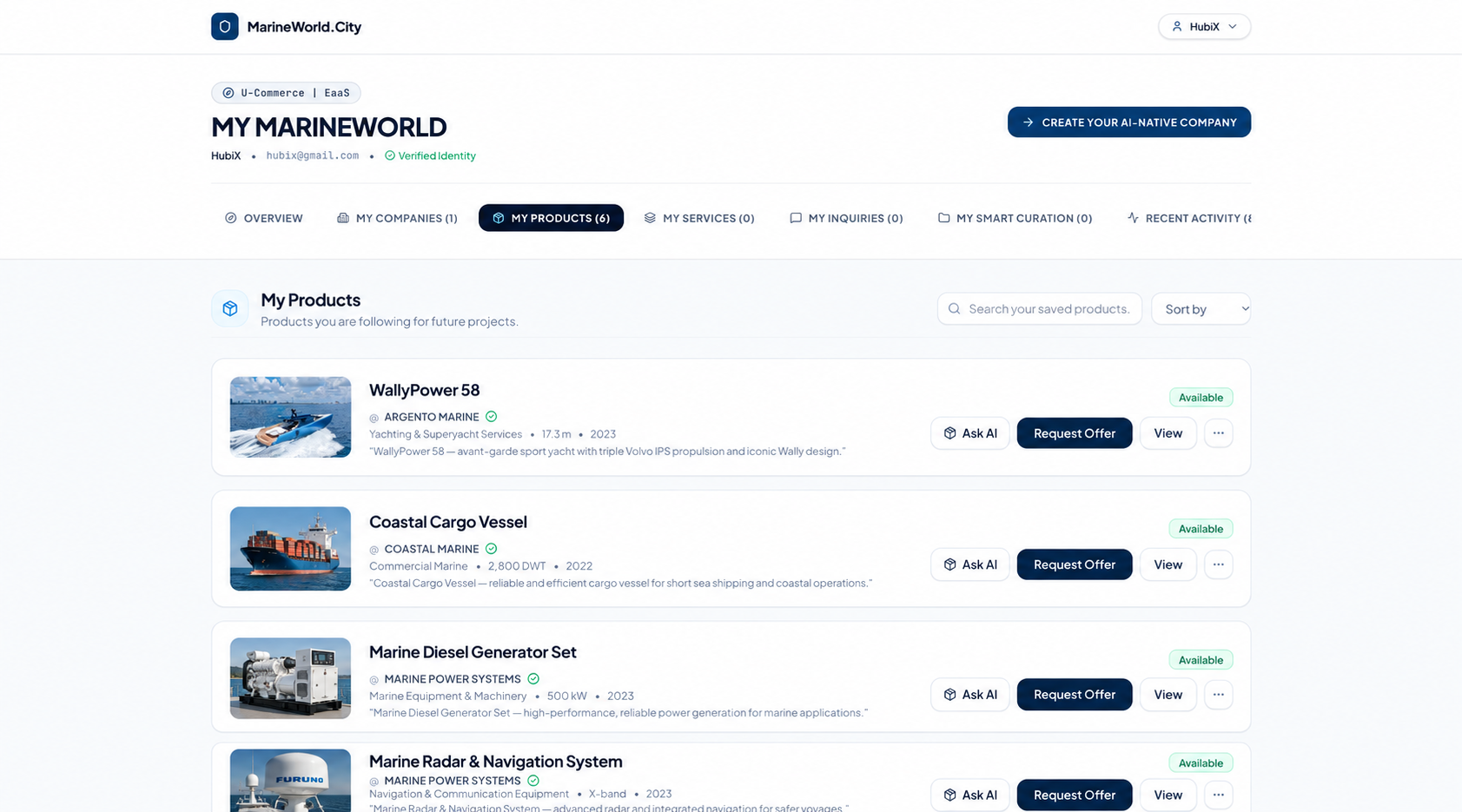
02 — The public offering showroom
Open a selected offering directly. This WallyPower 58 example shows its own URL, supplying company, imagery, sharing and RFQ or offer actions.
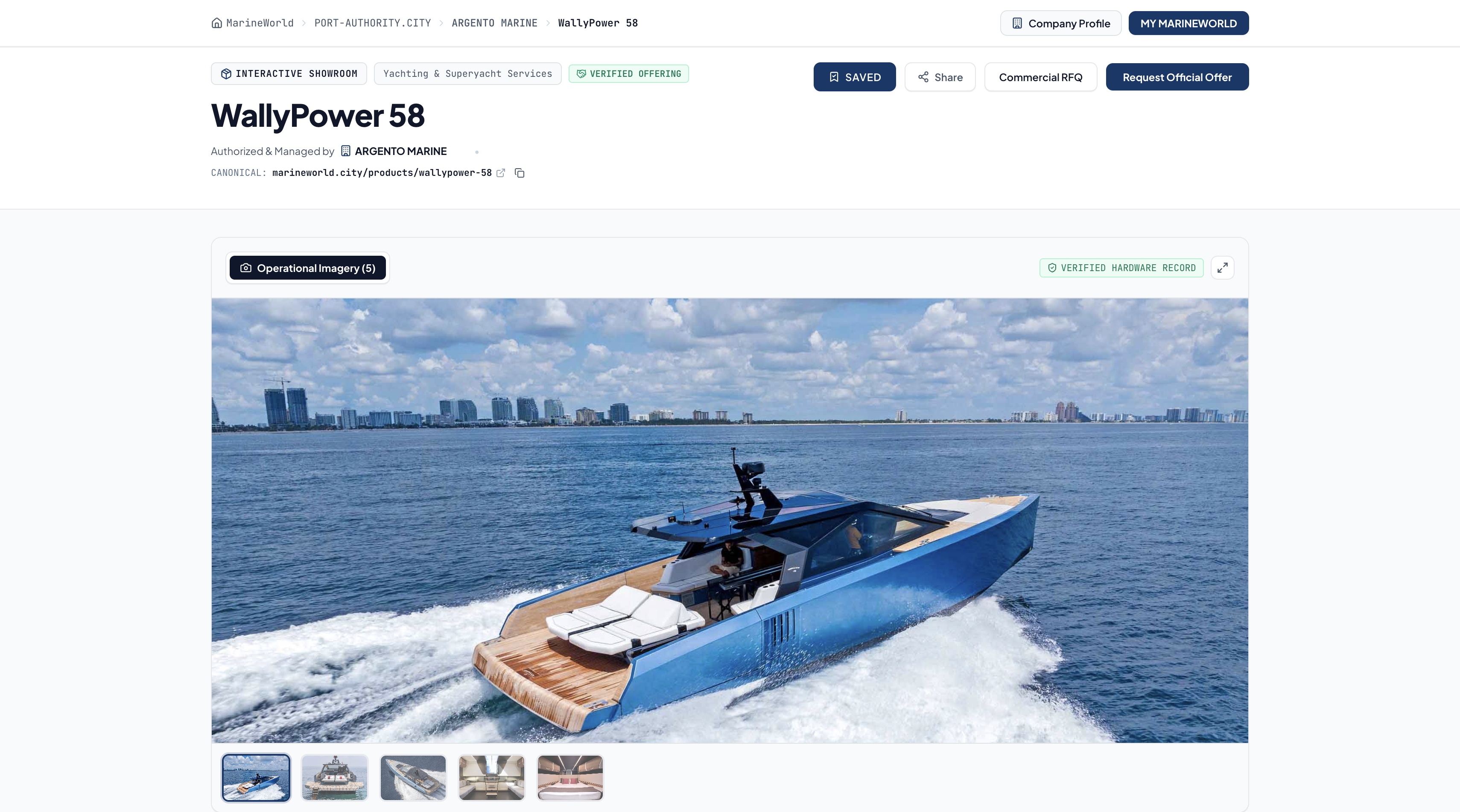
The first screen is an illustrative edited personal workspace; the second is an actual single product’s public showroom. Your personal curated showroom brings your selected offerings together.
Explore the showroom guide ↗Explore the possibilities.
Direct URLs: company, offering & showroom
Share the link.
Open the business.
Share your showroom URL and open your own curated space directly. Each selected company, product and service keeps its exact destination.
No new platform search. No intervening advertisements. Direct access to the destination you shared—including the offerings selected inside a showroom.
Explore how Business URLs work ↗Use URLs in AI-assisted research
One business URL.
More ways to work with it.
Use the exact company, product, service or showroom URL as a source in an AI-assisted research workflow. Where the tool supports web access and can read the page, ask it to summarize the information, compare offerings or help prepare your next business question.
Bring the company, offering or showroom link into your preferred AI-assisted workspace.
Explore accessible source information and organize it for your own research or business needs.
Open the original URL for the current company or offering information and direct commercial routes.
Tools such as Gemini, Microsoft Copilot and Google’s AI-powered search experiences have their own access, retrieval and indexing requirements. Adding a link does not automatically publish it into general AI search, grant private access or guarantee an immediate response.
Your next company or ecosystem step
Start with a showroom.
Develop your next business step.
When you are ready to establish your own AI-Native Company presence, explore the company setup path. Creating a showroom and establishing a company presence are distinct steps.
Explore the company path ↗Present your value to a company
Show the value you bring.
Start the conversation today.
Find a company or brand you understand. Use Direct Message to introduce yourself, explain the opportunity you see and propose how you could help develop its business.
Introduce your expertise.
Tell the company which sector you know, your relevant experience and the markets or customer groups you understand.
Make a concrete proposal.
Explain how you could connect its offerings with buyers, develop a territory, support technical sales or build a local service relationship.
Agree how to work together.
Discuss your role, territory, commercial discount or compensation, responsibilities and next steps directly with the company. Confirm the terms both sides accept.
Build your own business presence.
Start with your free interactive showroom. As your business takes shape, follow the AI-Native Company path to establish your own connected company presence.
Who you are → What you know → Which opportunity you see → What value you can bring → The next step you propose.
Start the discussion today and move toward an agreement when both parties are ready. Showroom curation alone does not create a sales mandate or guarantee a deal.
Build your approved supply network
Build your own
approved supply network.
Explore companies, products and services across 82 maritime Sector Cities. Bring the manufacturers, OEMs, service providers, logistics businesses and specialist partners relevant to your work into one curated, connected business space.
Discover from open business sources.
Start with the public company and offering information available across the Sector Cities. Review capabilities, specifications, supporting documents and relevant AI Advisors at their source URLs.
Select against your requirements.
Compare the options that matter to your project or business. Use Direct Message, inquiries and RFQs to clarify scope, availability, technical fit and commercial terms with each company.
Curate your own supplier structure.
Organize selected companies, products and services in your interactive showroom by category, project, equipment need or sourcing focus. Share its URL to give others direct access to the context you have assembled.
Develop approved relationships.
Apply your own supplier evaluation and approval process, agree terms directly and build ongoing relationships. Keep the source company and offering URLs connected as your network evolves.
“Approved” means accepted through your own sourcing criteria and due diligence. Adding a company to a showroom is curation; it does not automatically approve that supplier or create a supply contract. Public-source business information is distinct from open-source software or unrestricted reuse rights.
A few clear answers.
How can I start trading for free today?
Start with the sector you understand. Use your free showroom to connect relevant offerings with companies and potential customers, then develop a commercial arrangement directly with the supplier.
- Create your showroom. Sign in with your own email and organize your space into the categories you know best.
- Select relevant offerings. Add companies, brands, products and services. Their connected company information and offering resources remain accessible.
- Contact the company. Use Direct Message to introduce yourself and present the value you can bring. Explain your expertise, target customers or market opportunity. Use an inquiry or structured RFQ when you need a quotation.
- Agree your commercial role. Discuss pricing, commercial discounts, payment, delivery and any referral, resale or representation arrangement directly with the company.
- Share and develop the opportunity. Share your showroom URL with relevant contacts. If the company authorizes you, develop sales in the agreed countries or territories.
- Proceed to business. Confirm the offer and agreed terms, place an order where appropriate and work toward closing the transaction with the relevant parties.
The platform workflow is free to use. A trade still depends on a real buyer, supplier agreement and applicable product or service terms. International sales depend on the company’s agreed territories and delivery capabilities.
Create your free showroom and start connecting ↗What opens when I share a link?
The exact destination you share: a company URL opens that company, a product or service URL opens that offering, and a showroom URL opens that showroom. Products and services selected inside a showroom also keep their direct destinations. Recipients do not have to search MarineWorld again, and no advertisement is inserted between the shared link and its destination.
What is free?
Creating, categorizing and sharing your interactive showroom is free. The professional showroom workflow—including connected company and brand access, Direct Message, inquiry/RFQ, quotations, negotiation, commercial agreements and order or deal workflows—is also free to use. Products and services you purchase, and any separately agreed commercial obligations, still have their own prices and terms. Company plans and Digital Property rentals are separate services.
Do I need to create a company first?
No. You do not need to establish a company before creating your free interactive showroom. Sign in with your own email, organize your space into categories and select the companies, brands, products and services relevant to your expertise. Share your showroom URL, introduce yourself through Direct Message and discuss inquiries, quotations and commercial opportunities directly with the companies. As your own business takes shape, you can take the next step and establish your AI-Native Company presence through the company onboarding process.
Does selecting a product make me its authorized seller?
Adding an offering connects its company and brand to your showroom; it does not automatically appoint you as a seller or representative. Use Direct Message to discuss reseller, referral, distribution or sales arrangements. Agree the role, territory, commercial discount or compensation and fulfillment responsibilities directly with the company before representing its brand.
Can I begin while working for another company?
Yes. You can contribute to the company you work for while developing your own professional connections. Help your employer explore an AI-Native Company presence, connected offerings and new customer relationships; company setup and administration are handled by its authorized team. In your own free interactive showroom, curate relevant companies and offerings, share your expertise, connect through Direct Message and develop commercial agreements with willing partners. Keep your personal activity consistent with your employment responsibilities and any permissions needed to represent your employer or a brand. When you are ready to develop your own business, you can also follow the AI-Native Company onboarding path.
What happens when an offering changes?
Offerings reference source URLs. Information remains connected to the source, and removal from source inventory removes the connected offering placements.
Your expertise. Your proposal.
Your first business connection.
Bring firms onto MarineWorld.
Build their AI-Native Companies.
Choose Company Sales Partnership—or propose a Country Sector City operation backed by your local network.
Explore the two partner models →